
If you're running a remote-first SMB, you've probably wondered: "How can I protect my distributed team with enterprise-grade security without breaking the bank?" Let's discuss building your Firewall as a Service using Palo Alto Networks Next-Generation Firewall (NGFW) and GlobalProtect.
Why does this matter?
Many companies today aren't just using Next-Generation Firewalls to protect their servers. They're using them to shield their users from the bad stuff: phishing attacks, data leaks, and other cyber threats. Plus, server protection is less relevant than it used to be. Because everyone's moving to SaaS applications for almost everything - from Office365 and Google Workspace for email to HubSpot and SalesForce for marketing and sales.
Of course, you can buy a firewall to protect your users, but there are some real challenges to tackle. Let's break them down.
Why Do Traditional Solutions Fall Short for Modern SMBs?
The Hardware Dilemma
Physical NGFWs are more affordable than ever. Palo Alto Networks' PA-400 series firewall is bringing enterprise-grade security within reach of SMBs. However, many companies, even those with 50+ employees, don't have a physical office anymore, or their teams are spread across different locations, working remotely or in hybrid setups.
The Enterprise-Only Club
SASE, SSE, and Zero-Trust solutions sound great on paper, but there's a problem. While vendors like Palo Alto Networks, Fortinet, Netskope, and Zscaler compete to offer the shiniest and fanciest, they mainly target larger organizations (200+ employees). Most require minimum purchases of 200 licenses, and once you add the add-on features you need, the costs start piling up - the base products usually only cover the basics.
The VPN Trap
Traditional VPNs, whether free or paid, have some serious limitations. Despite all the marketing about protection, a VPN only does one thing: creates a secure tunnel between your device and its server/router. But that raises some important questions:
- Who's actually controlling these servers?
- What happens to your traffic once it reaches them?
- What about essential features like:
- Malware protection
- Malicious domain/IP blocking
- Data leak prevention
- Geo-restriction capabilities
- Client compliance checks
- And the list goes on...
The Practical Solution
While it's possible to spin up Palo Alto Networks NGFWs in public cloud environments, creating a properly architected, auto-scaling security infrastructure requires deep expertise in both cloud architecture and enterprise security. Our solution leverages Infrastructure as Code (Terraform) to automate the deployment and management of your security infrastructure in the cloud, handling complex aspects like high availability, fault tolerance, and automatic scaling. Though it's not the absolute cheapest option out there, a properly implemented solution delivers exceptional value through reduced operational overhead and enterprise-grade security.
Key Benefits:
Flexibility and Scalability
- Start small and scale resources based on your actual needs
- Easily adjust capacity as your team grows
- Pay only for what you use
Global Footprint
- Leverage the cloud provider worldwide infrastructure
- Keep latency low and reliability high for remote workers
- Deploy gateways closer to your team clusters
Enterprise-Grade Protection
- Block malware and zero-day attacks before they reach your team
- Filter out malicious URLs and bad IP addresses
- Get advanced DNS security and anti-spyware protection
- Typical example: One of our clients blocked over 200 malware attempts and 7,000 suspicious URLs in their first month alone
Secure Application Access
- Create secure channels for accessing company SaaS applications
- Monitor and control how apps are being used
- Ensure compliance with security policies
Enhanced Data Control
- Prevent sensitive data from leaving your network
- Get detailed visibility into data movement
- Set up smart rules for different types of data
Client Compliance
- Make sure endpoints meet security requirements
- Verify that anti-malware/anti-virus is up-to-date
- Check disk encryption and patch status
- Block risky connections to sensitive apps
Universal Compatibility
- Works on Android, iOS, macOS, and Windows
- No extra licensing fees for different platforms
- Consistent experience across all devices
Intelligent Traffic Management
- Use split-tunneling for allowed applications
- Direct access to trusted domains like google.com
- Optimize bandwidth for streaming services
Advanced Authentication Options
- Integrate with your existing systems (e.g., Azure Entra ID)
- Support for multi-factor authentication
- Set up conditional access policies
- Use certificate-based authentication
Components & High-level Deployment
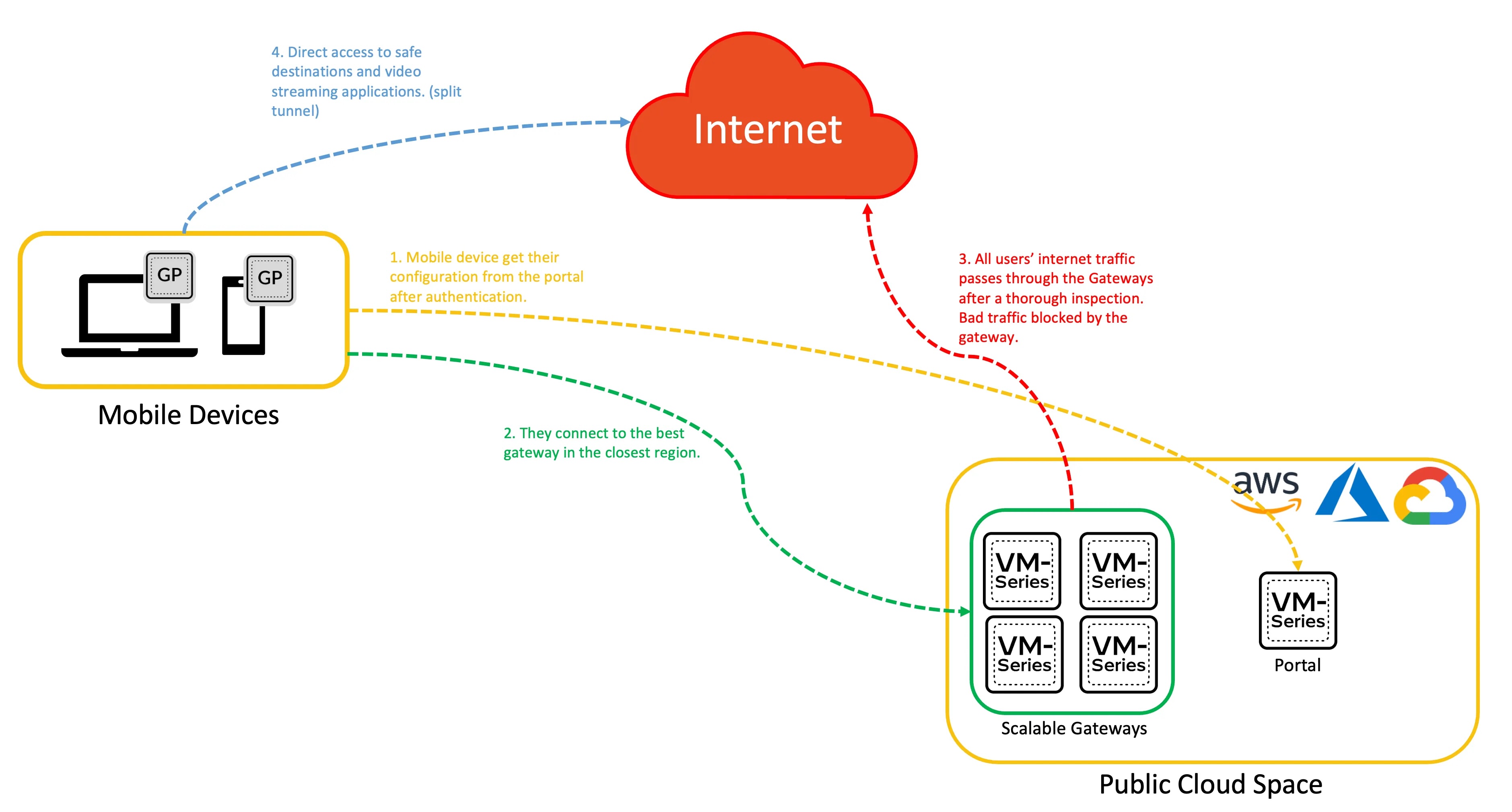
Let's break down the key components:
The GlobalProtect Portal (the brain)
Think of this as your control center. It:
- Manages app distribution and configurations
- Acts as the first point of contact for users
- Provides information about available gateways (point-of-enforcement)
- Handles client certificate distribution when needed
GlobalProtect Gateway(s) (the muscles)
These are your security enforcers. They:
- Apply security policies
- Provide VPN connectivity
- Can be deployed as external gateways for remote access
- Support both IPSec and SSL VPN tunneling
The GlobalProtect App
This is the software that runs on your team's devices. It:
- Creates secure connections to your network
- Works on Windows, macOS, Linux, iOS, and Android
- Can be deployed through:
- Portal download
- MDM systems
- Public app stores
Implementation Timeline
A typical deployment follows this timeline:
- Week 1: Infrastructure setup and initial configuration
- Week 2: Testing and pilot group deployment
- Week 3-4: Gradual rollout to all users
- Week 5+: Optimization and fine-tuning
Common FAQs
Q: What happens if our internet connection drops?
A: GlobalProtect can automatically reconnect when internet access is restored, and you can configure backup gateways for redundancy.
Q: What's the minimum size company this makes sense for?
A: This solution is cost-effective for companies with 20+ users who need enterprise-grade security.
Q: What if we get bigger than 200+? Is this investment goes down the drain?
A: This solution is enterprise-grade and is scalable to tens of thousands of users. Plus, if you want to adopt Prisma SASE, it's almost seamless because you're using the same technology to connect - GlobalProtect.
Q: How does this help with compliance?
A: The solution supports various compliance requirements (GDPR, HIPAA, etc.) through features like DLP, encryption, and detailed logging.
Q: Can we have physical firewalls as well?
A: Absolutely, your physical firewall can be a part of this architecture as a portal or gateway.
SafeMesh - Your Implementation Partner
Our security architects at SafeMesh can get you started quickly:
Proof of Concept (PoC)
- Setup within hours
- Test with a subset of your endpoints
- Get a comprehensive traffic analysis report
- See real security threats blocked in your environment
Full Implementation
We handle everything:
- Cloud configuration and IaC (Terraform)
- Cloud security guardrails and budget
- Portal and gateway configuration
- Authentication setup
- MDM integration/deployment
- Security policy implementation
- Advanced security features activation
- Monitoring and reporting setup
- Private PKI if necessary
Flexible Management Options
- Start with full management by our team
- Transition to self-management when ready
- Get comprehensive documentation and training
- Maintain complete control of your infrastructure
Ready to secure your remote team with enterprise-grade protection? Let's talk about setting up a PoC and see the solution in action with your actual traffic. Contact us at contact@safemesh.ca